






Whether you are printing brochures, catalogs, or even textbooks, understanding the printing process is essential for producing professional-quality materials. One term that often confuses beginners is “collate”. Knowing the meaning and application of collate printing can save you time, effort, and money when printing multiple copies for your business.
In this guide, we’ll break down what collate means in printing, how it works, its benefits, and how you can use it for your business printing projects.
What Is Collate Printing?
Collation printing refers to the process of assembling multiple printed copies in a specific order. Instead of printing pages randomly, collation ensures that each set is properly organized and ready to use.
For instance, if you are printing a 10-page booklet in 50 copies, collated printing guarantees that each copy contains pages 1 to 10 in the correct sequence. This method eliminates the need for manual sorting, making the entire printing process faster and more efficient.
Why it matters: Collated printing is essential for documents like books, comics, magazines, catalogs, and business brochures. Without collate printing, preparing multiple copies would take significant time and could lead to errors.
How Collation Works in Printing
Collation can be done manually or automatically, depending on the type of project and the technology available.
1. Manual Collation
Manual collation involves arranging printed pages by hand. This method is typically used for small-scale projects or when high precision is required.
Steps in manual collation:
- Compare pages carefully.
- Align text, images, and formatting in the correct order.
- Assemble each copy set by hand.
Manual collation requires attention to detail but is still relevant for limited editions, special documents, or projects where exact customization is necessary.
2. Automatic Collation
Automatic collation uses advanced software or printing machines to assemble printed pages in the correct order.
How it works:
-
The software compares formatting, font styles, and spacing.
-
Pages are automatically collected and organized into sets.
-
Multiple sets are produced without human intervention.
Automatic collation is highly efficient for large-scale printing projects, significantly reducing production time and costs while maintaining accuracy.
Benefits of Collated Printing
Collated printing offers numerous advantages for businesses and professional printing projects:
Cost Savings
By automating the process, collated printing reduces labor costs associated with manual sorting. Fewer mistakes mean fewer reprints, saving both time and money.
Better Quality
Automatic collation ensures each set is accurate and consistent. This is particularly important for multi-page documents, ensuring your business materials always look professional.
Faster Production
Eliminating manual sorting speeds up production. Whether you are printing 50 or 500 copies, collated printing ensures faster turnaround and timely delivery.
Ease of Use
Modern printing machines with collate functions are user-friendly, allowing even beginners to produce high-quality printed materials efficiently.
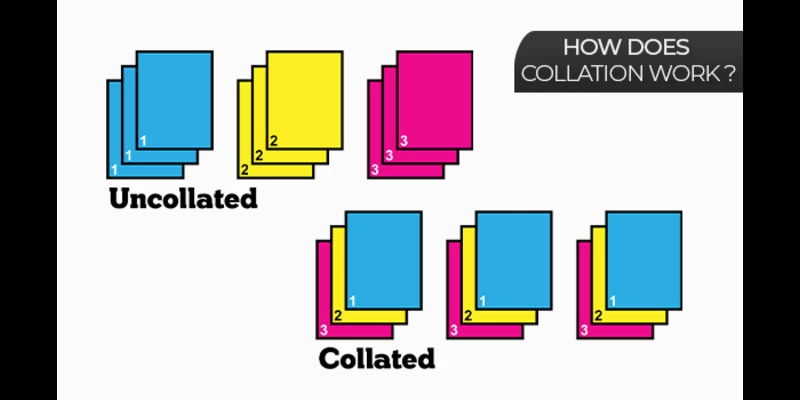
Collated vs. Uncollated Printing
It’s important to understand the difference between collated and uncollated copies:
-
Collated Copies: Pages or sets are printed in a specific sequence. Perfect for multi-page documents like booklets or manuals.
-
Uncollated Copies: Pages are printed without a specific order. Suitable for single-page flyers, forms, or materials where sequence doesn’t matter.
Choosing the correct type depends on your printing project and intended use.
Applications of Collate Printing for Businesses
Collate printing is widely used in various industries. Here’s how it benefits businesses:
-
Book Publishers: Ensures each copy of a book has all pages in the correct order.
-
Marketing Materials: Catalogs, brochures, and promotional guides remain organized and professional.
-
Educational Institutions: Textbooks and study guides can be printed in large batches efficiently.
-
Corporate Documents: Manuals, reports, and training materials are delivered ready to use.
By using collated printing, businesses can maintain professionalism, reduce errors, and save valuable time.
Tips for Using Collate Printing Effectively
To get the most out of collate printing, consider the following tips:
-
Choose the Right Printing Method: Automatic collation is ideal for large-scale printing, while manual collation works for specialized, small-batch projects.
-
Check Page Order Before Printing: Double-check your document layout to avoid mistakes.
-
Use High-Quality Paper and Materials: Premium materials improve the durability and appearance of your printed sets.
-
Work With Professionals: Experienced printing companies can guide you on the best collation methods for your project.
Why Collate Printing Matters for Your Brand
Professional-looking materials create a positive impression of your brand. Collated printing ensures:
-
Consistency Across Copies: Each set is uniform and ready to distribute.
-
Time-Saving Production: Allows you to meet deadlines efficiently.
-
Enhanced Customer Experience: Clients receive materials that are well-organized and easy to use.
-
Better Marketing Impact: Collated brochures, catalogs, or manuals enhance your brand’s credibility.
Advanced Collation Features
Modern printing technology offers additional features for collated printing:
-
Color-Coded Collation: For multi-department documents or multi-language versions.
-
Custom Sorting Options: Sort pages by section, topic, or chapter.
-
Digital Collation Integration: Automates page assembly directly from digital files for accuracy and speed.
These features make collate printing more efficient and adaptable to different business needs.
Conclusion: Mastering Collate Printing for Business Success
Collate printing is more than a technical term—it is a crucial tool for modern businesses looking to print professional and organized materials efficiently. Whether you are a small business printing promotional brochures or a large publisher producing textbooks, collated printing ensures quality, consistency, and time-saving production.
By understanding the collation process, the difference between collated and uncollated copies, and the benefits it provides, you can make smarter decisions for your printing projects.
Invest in collated printing today and enhance the quality, professionalism, and effectiveness of your business materials.